The Wonderkid's school decided to have Teacher Appreciation Days this week instead of at the end of the school year. I understand the thinking (parents aren't likely to be as busy right now as they will be at the end of the school year) but I can't imagine not doing something for the teachers when school ends. Any way, it gave me a direction for all of them candy making fun. In the end, I covered anything in chocolate that didn't move (and the Wonderkid did his best to cover himself in chocolate).
Here are the chocolate covered strawberries. I'm still working out how these will get packaged (assuming they make it out of the house at all).
Now are you starting to understand why I wasn't able to take part in any of the challenges this week? It has been a little crazy around here.
These are some of my favorites. They are chocolate covered oreo cookies. Wilton sells these wonderful molds. I must say, I was a little challenged at first because I hadn't fully followed the instructions. You get the best results if you pipe the different colors of chocolate into the mold and let it harden just a bit, then pipe in the color that will surround the cookie. After you push the cookie into all the chocolate-y goodness you put the filled molds into the refrigerator. Once the chocolate takes on a frosty color they will just drop out of the mold when you turn the mold over. Then, put the cookies into a cello bag (I buy the Micheal's brand bags with a coupon). Then, I pull out my Cricut and start making the toppers.
Here is one with the topper. Because we are celebrating Teacher Appreciation Days but it is also Valentines, I used a conversation heart and wrote "Thank U" with the same font style as the conversation hearts. I put the conversation heart onto a black out of the heart and put all of that over a wonderful frame from SVGCuts. All of that went over a 4 inch x 3 inch scored and folded piece of designer paper. All of the papers I used came from the K and Company Valentines stacks. I must say, I loved knowing that everything would coordinate and that the backs would be as beautiful as the fronts.
Here are a few more of the cookies. You can see I made a number of different designs and used different DP.
What do you think of the cookies?
Here are the pretzels.
I made them with both chocolate and white chocolate. Wilton has molds for the pretzels also but I decided not to take the time to mold them. I also find that the molds use a lot of chocolate so I don't like to do too many of them. I put together a dozen pretzel rods for each of the Wonderkid's main teachers.
Here is a huge pile of the pretzels and you can read the stamping I did on these.
I did some that said "Thanks!" and others use a Tim Holtz stamp. "it's the little things that make life big." I thought those were fitting and allowed me to use them for some of the neighbors and family friends.
What do you think of all the treats and their pretty packaging?
Tomorrow I'll show you the shirt I made for the Wonderkid to wear to school.
Showing posts with label SVG Cuts. Show all posts
Sunday, February 13, 2011
Thursday, February 10, 2011
Valentines Mailboxes
It is quite a week. I haven't taken part in any of my favorite challenges (and I had a great idea for a rosette and a button for Bah! Humbug! Challenges but the first try didn't work perfectly and I just didn't have time to give it a second try). Here is one of the many reasons I've been so busy.
I made mailboxes for the Wonderkid's class. Whenever I mentioned I was making these mailboxes, friends and family said, "When I was a kid we used a paper bag and some glitter for our valentines." I completely forgot about those paper bags. Hey, the Wonderkid is only going to let me do this for a couple of years and then he will want those horrible store bought valentines and "what all the other kids have." Until then...
This cut is from SVGCuts Valentines Mailboxes Kit. It comes with three different styles. One looks like the big American mail boxes that you see outside the post office or pre - 9/11 you would see on street corners. However, mine have a bit of a twist. They are done with a Dr. Suess theme (or as the Wonderkid refers to him, Dr. Sue). The Wonderkid's class has been studying Dr. Suess and my little one thinks he is pretty cool. We read The Cat In the Hat or One Fish Two Fish almost every night.
I was getting tired of hearts and pink and really didn't want to make gender specific mailboxes so...
This is a picture of the tops of the mailboxes.
I made the bottoms yellow, the ends red, the top is white with printed pictures of Dr. Suess book covers and then I used a blue ribbon to make everything look nice and clean around the sides.
Here is a picture of the first step. As you can see, the front is a very clean rounded flap but the back has almost a scalloped look. Using SCAL2 they are easy to score with just your fingers. It is interesting, I don't like the score marks on most of the Cricut brand cuts but the ones from SVGCuts work a lot better. I'm not certain if it is where they place them or what but I delete the ones from cricut cuts and keep the ones from SVGCuts. Here is a close-up of the bottom, front and back.
This is a pile of the mailboxes without the outer layer, no magnet to keep it closed and before any of the details have been put in place.
One of my modifications to the file, instead of putting a ribbon around the middle so I could tie the front flap up, I put a 2 inch by .75 inch piece of paper under the outer cover. On the back side of that flap is a magnet. Then, under the front flap I put a small washer. The magnet is just strong enough to keep the front flap up but not so strong that it will rip the flap.
Here is the front, see how the flap stays up. I used the text in a path feature in SCAL2 to type Happy Valentines. I used Dr. Suess font. I messed with the placement until I got it exactly where I wanted it. I also used Dr. Suess font for each child's name. I colored all of the letters by hand. I know technically I could have used the cut and print function but I didn't have time to work out the details of changing the color and so on.
I think these little heart brads looked perfect with the colors of the book covers. I meant to put a heart on the flag but I didn't get it done before I delivered them this morning.
Here is one more view of the side.
Finally, the front of a couple of the boxes. I think they look fun all in a row with the names on them.
I hope this has given you some unique ways to use color and themes.
Thank you for looking. Tomorrow I'll have some information on the take-out box I'm making with the children in the Wonderkid's class. We'll see how well this craft project goes. I may be in over my head.
I made mailboxes for the Wonderkid's class. Whenever I mentioned I was making these mailboxes, friends and family said, "When I was a kid we used a paper bag and some glitter for our valentines." I completely forgot about those paper bags. Hey, the Wonderkid is only going to let me do this for a couple of years and then he will want those horrible store bought valentines and "what all the other kids have." Until then...
This cut is from SVGCuts Valentines Mailboxes Kit. It comes with three different styles. One looks like the big American mail boxes that you see outside the post office or pre - 9/11 you would see on street corners. However, mine have a bit of a twist. They are done with a Dr. Suess theme (or as the Wonderkid refers to him, Dr. Sue). The Wonderkid's class has been studying Dr. Suess and my little one thinks he is pretty cool. We read The Cat In the Hat or One Fish Two Fish almost every night.
I was getting tired of hearts and pink and really didn't want to make gender specific mailboxes so...
This is a picture of the tops of the mailboxes.
I made the bottoms yellow, the ends red, the top is white with printed pictures of Dr. Suess book covers and then I used a blue ribbon to make everything look nice and clean around the sides.
Here is a picture of the first step. As you can see, the front is a very clean rounded flap but the back has almost a scalloped look. Using SCAL2 they are easy to score with just your fingers. It is interesting, I don't like the score marks on most of the Cricut brand cuts but the ones from SVGCuts work a lot better. I'm not certain if it is where they place them or what but I delete the ones from cricut cuts and keep the ones from SVGCuts. Here is a close-up of the bottom, front and back.
This is a pile of the mailboxes without the outer layer, no magnet to keep it closed and before any of the details have been put in place.
One of my modifications to the file, instead of putting a ribbon around the middle so I could tie the front flap up, I put a 2 inch by .75 inch piece of paper under the outer cover. On the back side of that flap is a magnet. Then, under the front flap I put a small washer. The magnet is just strong enough to keep the front flap up but not so strong that it will rip the flap.
Here is the front, see how the flap stays up. I used the text in a path feature in SCAL2 to type Happy Valentines. I used Dr. Suess font. I messed with the placement until I got it exactly where I wanted it. I also used Dr. Suess font for each child's name. I colored all of the letters by hand. I know technically I could have used the cut and print function but I didn't have time to work out the details of changing the color and so on.
I think these little heart brads looked perfect with the colors of the book covers. I meant to put a heart on the flag but I didn't get it done before I delivered them this morning.
Here is one more view of the side.
Finally, the front of a couple of the boxes. I think they look fun all in a row with the names on them.
I hope this has given you some unique ways to use color and themes.
Thank you for looking. Tomorrow I'll have some information on the take-out box I'm making with the children in the Wonderkid's class. We'll see how well this craft project goes. I may be in over my head.
Sunday, January 30, 2011
Kraft Explosion Box
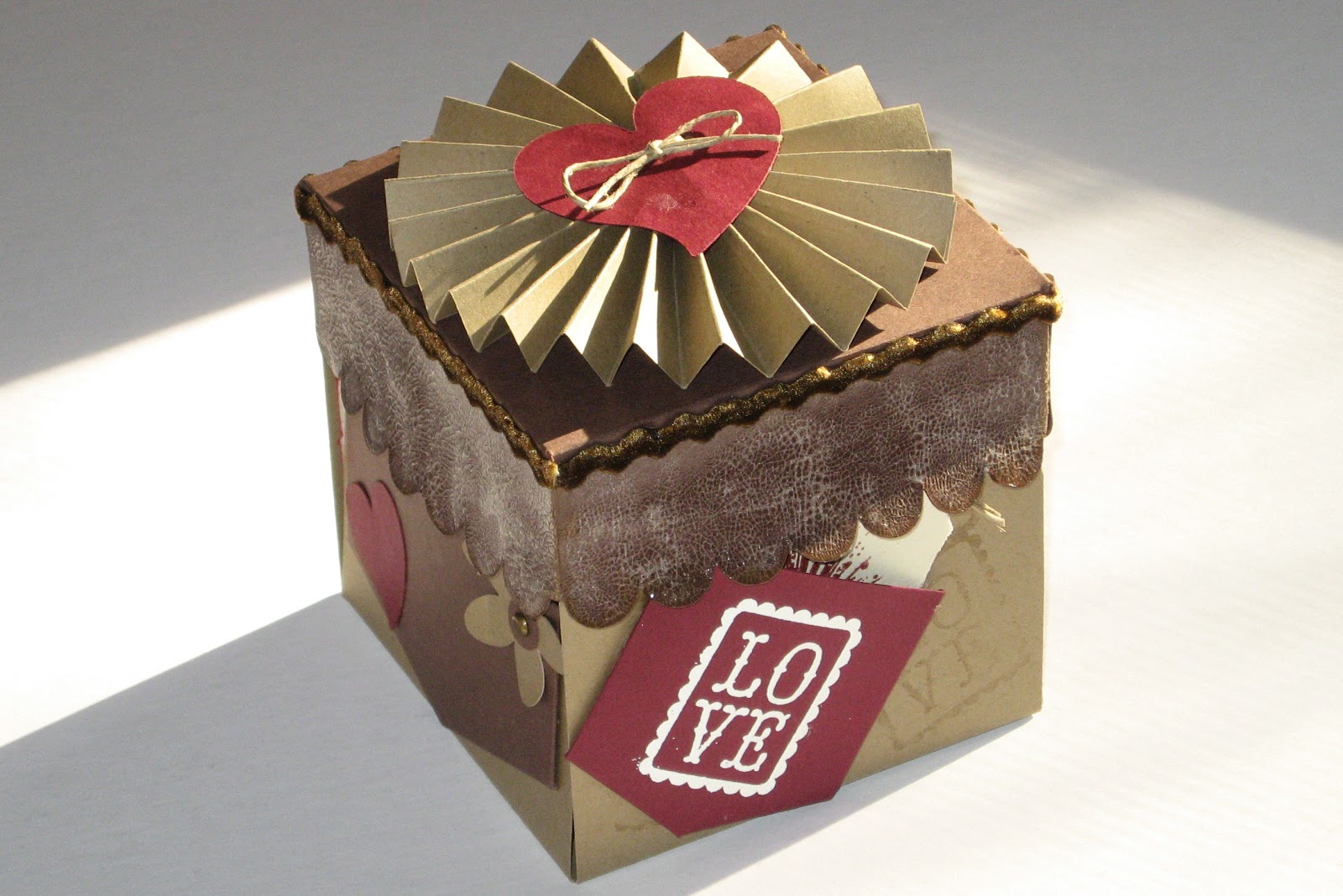
I want to show you a fun project today. It is an explosion box using kraft paper, brown paper and cream paper with just a little bit of red. I really pushed myself on some of the techniques but I'm so pleased with the way it turned out. It just goes to show, trying something new can be very rewarding. The cuts were all done using my Cricut (it requires a 12 x 12 mat) and SCAL2. I used an SVG from SVGCuts. You can find the explosion box here.
First the top. I have never made paper rosettes before. I love them, I've been eying them but I hadn't tried them. I must say, I think I'll be doing more. This rosette is two strips of kraft paper, each 2 inches wide. I then scored them every half inch, glued them together and pushed the middle down so it would fan out for the rosette. I then glued a one inch circle to the back of the rosette and the heart with the twine through it to the top of the rosette.
Here is a close-up of the top.
On the edge of the top, I glued a piece of velvet ric-rac from Creative Charms. I love the way the velvet ric-rac looks with the kraft paper. It is elegant with out being inappropriate. I also used Crackle paint along the sides of the top. I used Rock Candy so it would have texture without adding color.
I think this side is my favorite. You can see the velvet ric-rac again. I heat embossed the LOVE stamp on the pocket. I also heat embossed a great Tim Holtz stamp to the tag.
Isn't that fun. The final thing on this side, I used Versamark to give the kraft paper a little bit of texture. I stamped the LOVE stamp under the pocket and through out the side.
This is another side. The flower is part of the cuts from SVGCuts. The brad in the middle is one of the very fun ones from Creative Charms.
Here is the explosion box opened up. Doesn't it look fun. All of the pictures were taken at one sitting this last Thanksgiving.
You can see more of the velvet ric-rac and the brads in the middle say "We Love You". They are from the Spare Parts by the Paper Studio. It is the Hobby Lobby line of products.
Here you can see more of the mats. I put pictures on the back of each side, in addition to the front. I never print pictures at wallet size (and normally don't know that to do with wallet sized pictures when I get them) but this was the perfect size. On the inner pages I really couldn't frame or mat them but the second and third level was perfect for matting.
One last shot of the pages.
I think there will be more explosion boxes in my future. They are sooo much fun. Thank you for looking and let me know what you think.
First the top. I have never made paper rosettes before. I love them, I've been eying them but I hadn't tried them. I must say, I think I'll be doing more. This rosette is two strips of kraft paper, each 2 inches wide. I then scored them every half inch, glued them together and pushed the middle down so it would fan out for the rosette. I then glued a one inch circle to the back of the rosette and the heart with the twine through it to the top of the rosette.
Here is a close-up of the top.
On the edge of the top, I glued a piece of velvet ric-rac from Creative Charms. I love the way the velvet ric-rac looks with the kraft paper. It is elegant with out being inappropriate. I also used Crackle paint along the sides of the top. I used Rock Candy so it would have texture without adding color.
I think this side is my favorite. You can see the velvet ric-rac again. I heat embossed the LOVE stamp on the pocket. I also heat embossed a great Tim Holtz stamp to the tag.
Isn't that fun. The final thing on this side, I used Versamark to give the kraft paper a little bit of texture. I stamped the LOVE stamp under the pocket and through out the side.
This is another side. The flower is part of the cuts from SVGCuts. The brad in the middle is one of the very fun ones from Creative Charms.
Here is the explosion box opened up. Doesn't it look fun. All of the pictures were taken at one sitting this last Thanksgiving.
You can see more of the velvet ric-rac and the brads in the middle say "We Love You". They are from the Spare Parts by the Paper Studio. It is the Hobby Lobby line of products.
Here you can see more of the mats. I put pictures on the back of each side, in addition to the front. I never print pictures at wallet size (and normally don't know that to do with wallet sized pictures when I get them) but this was the perfect size. On the inner pages I really couldn't frame or mat them but the second and third level was perfect for matting.
One last shot of the pages.
I think there will be more explosion boxes in my future. They are sooo much fun. Thank you for looking and let me know what you think.
Monday, January 24, 2011
Christmas Crackers
Last week I about pulled my hair out over the challenge at Bah Humbug Blog but this week I'm set. Last week was stencils (I could show you how to see what I made but honestly, I'd like to forget that creation).
Go get your coffee or a little something to hold you over. I've got a story and something to show you.
The challenge was to make something to do with Christmas Crackers. Here is the post so you can see what the design team made and the exact challenge. I recommend playing along if you get a chance.
I decided to make Christmas Crackers. I had been thinking about making these since Christmas Night but I hadn't gotten around to actually putting it all together. My family normally has Christmas Crackers on the table when we have our traditional Trivial Pursuit game and a light meal. We normally have this lovely meal of salmon, shrimp, cheese and crackers and some veggies and dip. We break open the Trivial Pursuit game and after a couple of glasses of wine we open our Crackers. This last year we didn't have enough crackers for everyone.
I should be clear, we live in Atlanta, Georgia, USA and Christmas Crackers are not a normal part of the holiday. We can sometimes buy them but they are terribly overpriced and not very good. While I have a brother that flies home from London to Atlanta for Christmas, whatever extra space he has in his bags is reserved for Wine Gums (people claim you can buy these in the states but they aren't the same).
So, I started thinking on Christmas night about making crackers for next Christmas. The Wonderkid thought crackers were fantastic and couldn't understand why we didn't have them every night. Half of this year's were musical instruments and the other half were random. We wore the lovely tissue paper crowns for the remainder of the night and periodically I still find the whistles from the musical crackers in random places (hidden by the Wonderkid).
Enough about my excitement for this challenge. Here is what I did.
I bought some paper at the post-holiday sales at Michaels. This is the paper.
Then I went and searched SVGCuts.com because I thought they had a cut so I could make these in my E. They did, it was even a freebie (have I mentioned how much I love SVGCuts?) They keep all of their freebies on their blog. Here is the cracker freebie.
So, I resized the cracker to the largest that would fit on an 8.5 x 11 piece of paper. It ended up being 6.5 inches wide and 10.75 inches high. I cut 6 of them out of three different pattern papers.
These are the three different patterns.
Then I added a tag. The scallop is from Mini Monograms. The sentiment is from The Cutting Cafe (a great place to find digi stamps, especially sentiments in a circle).
Then, I added a brad to the scallop to attach it to the cracker. I added 1/4 inch grosgrain ribbon to tie the crackers shut.
This is what it looks like. I haven't added the candy but I have a tissue paper hat inside already. I'll open one end up and add the candy in December. I read online you can purchase the mechanism that make them "crack". I'm off to purchase some for this year.
I hope you like my creation. If you know where to get the internal pieces, I'd love to hear. Thank you for looking and have a wonderful day.
Go get your coffee or a little something to hold you over. I've got a story and something to show you.
The challenge was to make something to do with Christmas Crackers. Here is the post so you can see what the design team made and the exact challenge. I recommend playing along if you get a chance.
I decided to make Christmas Crackers. I had been thinking about making these since Christmas Night but I hadn't gotten around to actually putting it all together. My family normally has Christmas Crackers on the table when we have our traditional Trivial Pursuit game and a light meal. We normally have this lovely meal of salmon, shrimp, cheese and crackers and some veggies and dip. We break open the Trivial Pursuit game and after a couple of glasses of wine we open our Crackers. This last year we didn't have enough crackers for everyone.
I should be clear, we live in Atlanta, Georgia, USA and Christmas Crackers are not a normal part of the holiday. We can sometimes buy them but they are terribly overpriced and not very good. While I have a brother that flies home from London to Atlanta for Christmas, whatever extra space he has in his bags is reserved for Wine Gums (people claim you can buy these in the states but they aren't the same).
![]() |
| This is a box of wine gums. |
So, I started thinking on Christmas night about making crackers for next Christmas. The Wonderkid thought crackers were fantastic and couldn't understand why we didn't have them every night. Half of this year's were musical instruments and the other half were random. We wore the lovely tissue paper crowns for the remainder of the night and periodically I still find the whistles from the musical crackers in random places (hidden by the Wonderkid).
Enough about my excitement for this challenge. Here is what I did.
I bought some paper at the post-holiday sales at Michaels. This is the paper.
Then I went and searched SVGCuts.com because I thought they had a cut so I could make these in my E. They did, it was even a freebie (have I mentioned how much I love SVGCuts?) They keep all of their freebies on their blog. Here is the cracker freebie.
So, I resized the cracker to the largest that would fit on an 8.5 x 11 piece of paper. It ended up being 6.5 inches wide and 10.75 inches high. I cut 6 of them out of three different pattern papers.
These are the three different patterns.
Then I added a tag. The scallop is from Mini Monograms. The sentiment is from The Cutting Cafe (a great place to find digi stamps, especially sentiments in a circle).
Then, I added a brad to the scallop to attach it to the cracker. I added 1/4 inch grosgrain ribbon to tie the crackers shut.
This is what it looks like. I haven't added the candy but I have a tissue paper hat inside already. I'll open one end up and add the candy in December. I read online you can purchase the mechanism that make them "crack". I'm off to purchase some for this year.
I hope you like my creation. If you know where to get the internal pieces, I'd love to hear. Thank you for looking and have a wonderful day.
Thursday, January 13, 2011
Kraft Thank You Card with a Florish
One of my favorite things to craft with is Kraft paper. I know it is brown and doesn't have a lot to it but it has such an organic look to it and I love to use it as a base. I'm not crazy about white (too easy to get dirty) and cream, vanilla, beige can be tough to match. I have some "cream" colored cardstock that has way too much yellow in it. In fact, it probably should be called "butter". OK, ok, enough about my love of Kraft paper and lets get on with it.
I recently found a blog and company the Kraft Journal and Kraft Outlet. Oh boy, this could be fun. They did a challenge this week to make something with a flourish. At first this doesn't seem to fit together. Florishes are fancy and elegant, Kraft paper is organic and down-to-earth. However, I wanted to play along. I decided to be very literal with the design. Here is my design. I used my Cricut Expression to cut the file. Don't blame the Cricut for the edges on the dark brown cardstock. It actually looks much better in person. It is funny, some things look better on the blog and others look better in person. I get very frustrated with dark cardstock with a white core. This is one of those.
This is a thank you card for a friend of mine. I don't think she is reading my blog so it should be safe to show before she actually receives it. The florish is a free file from SVGCuts. You can find this cut (already laid out as an A2 card) here. While you are there, I recommend looking at their other cuts. If you have SCAL and a Bug, you will love their work. It cuts like a dream and really is quite beautiful.
I used it in my SCAL2 program. It was designed as the top layer (the one on the right) but I wanted to add a shadow to it. SCAL has a wonderful feature allowing you to make a shadow or a blackout shadow of anything you choose. You can make just a tiny shadow or a much larger shadow. Or you can make a blackout of the items. This function is under "appearance" on the right side when you have the handles highlighted on an object. If you haven't done anything, it will say "Normal" if you want a shadow, you have seven options on the pull down menu (pointy, rounded and straight shadow, blackout, pointy, rounded and straight shadow blackout). Then you choose how thick to make your chosen option.
I also used SCAL2 for the lettering. I hate my handwriting so it is unlikely you will see me printing anything. Therefore, I love to use my Cricut to do headlines or lettering such as this card. I have a full set of the Cri-Kits pens with the holder. I love them. They work so much better than the ones that come from Provo Craft (mostly because they aren't markers, they are pens) and they work better than my old method of inserting a sharpie or gel pen into a pencil holder and then trying to get the placement "just right" so I could get a nice line. This font is part of the Lucinda package of fonts and was already loaded into my computer.
As much as I like the organic look of Kraft paper, I decided the card need a little bit of bling. I used a combination of embellishments from Creative Charms (another favorite of mine) and Recollections, the Michael's brand. I think they look great together. If you haven't checked out Creative Charms, I highly recommend them. They have a Deal of the Month and Kit of the Month. I love them and this months is great for valentines.
I hope you liked my card. I'll try not to "talk" so much tomorrow.
I recently found a blog and company the Kraft Journal and Kraft Outlet. Oh boy, this could be fun. They did a challenge this week to make something with a flourish. At first this doesn't seem to fit together. Florishes are fancy and elegant, Kraft paper is organic and down-to-earth. However, I wanted to play along. I decided to be very literal with the design. Here is my design. I used my Cricut Expression to cut the file. Don't blame the Cricut for the edges on the dark brown cardstock. It actually looks much better in person. It is funny, some things look better on the blog and others look better in person. I get very frustrated with dark cardstock with a white core. This is one of those.
This is a thank you card for a friend of mine. I don't think she is reading my blog so it should be safe to show before she actually receives it. The florish is a free file from SVGCuts. You can find this cut (already laid out as an A2 card) here. While you are there, I recommend looking at their other cuts. If you have SCAL and a Bug, you will love their work. It cuts like a dream and really is quite beautiful.
I used it in my SCAL2 program. It was designed as the top layer (the one on the right) but I wanted to add a shadow to it. SCAL has a wonderful feature allowing you to make a shadow or a blackout shadow of anything you choose. You can make just a tiny shadow or a much larger shadow. Or you can make a blackout of the items. This function is under "appearance" on the right side when you have the handles highlighted on an object. If you haven't done anything, it will say "Normal" if you want a shadow, you have seven options on the pull down menu (pointy, rounded and straight shadow, blackout, pointy, rounded and straight shadow blackout). Then you choose how thick to make your chosen option.
I also used SCAL2 for the lettering. I hate my handwriting so it is unlikely you will see me printing anything. Therefore, I love to use my Cricut to do headlines or lettering such as this card. I have a full set of the Cri-Kits pens with the holder. I love them. They work so much better than the ones that come from Provo Craft (mostly because they aren't markers, they are pens) and they work better than my old method of inserting a sharpie or gel pen into a pencil holder and then trying to get the placement "just right" so I could get a nice line. This font is part of the Lucinda package of fonts and was already loaded into my computer.
As much as I like the organic look of Kraft paper, I decided the card need a little bit of bling. I used a combination of embellishments from Creative Charms (another favorite of mine) and Recollections, the Michael's brand. I think they look great together. If you haven't checked out Creative Charms, I highly recommend them. They have a Deal of the Month and Kit of the Month. I love them and this months is great for valentines.
I hope you liked my card. I'll try not to "talk" so much tomorrow.
Sunday, January 2, 2011
Recipe/Photo Album
The idea for this project has been kicking around in my brain for quite some time. However, I had planned to make it for myself. In the end it became a present for my youngest brother. He enjoys cooking, he finds it's a stress reliever similar to how I feel about most cooking. So, I made this for him for Christmas.
This is the cover of the book. I planned on using my Bind-It-All for the binding but in the end it was a little over 2 inches thick and no one makes the binding rings large enough. I then planned to use O-Rings but the largest size you can buy at my Office Depot or Staples is 2 inches. It was a little tight but I was able to close them. I'm working on getting 3 inch rings so it will flip easily.
Here is a picture of one of the inside pages. It is actually an envelope mini-album. I used these envelopes
The envelope measures 9.5 inches by 6.5 inches. I have a ton of them around and use them constantly. They were the perfect size for this project. It meant each recipe card could be 8.5 inches by 6.45 inches and the pages measured at exactly half of an 8.5 by 11 inch piece of paper. I slit one side of the envelope, sealed the top as though I was mailing it and then covered them.
This is one of the pages with the recipe card pulled out. I made a frame for the picture using rolling pins found on "From My Kitchen". The phone is from the same cart. All of the recipe cards are made using a box from George and welding a tab off of "From My Kitchen".
Here is another page. I used the same rolling pin but this time I used the pie from Paper Dolls (I can't remember if it is Dress Up or Everyday).
This is the envelope with the recipe card inside.
Now pulled out. You can't read it very well but I used my Cri-Kits and wrote on the frame of this page. I used the same paper for the frame so it would blend in nicely. I also used my Cri-Kits to write the name of each recipe on the tab. I then colored them in using alcohol inks.
This is the Pumpkin Pie page. I make the pumpkin "glop" for the pies (not the canned pumpkin filling) that is why it explains which pumpkins to buy when making pumpkin pies. I had an extra pie so I put it on the recipe card instead of the envelope. The pie is made using "From My Kitchen" cart. The pumpkin is from SVGCuts' Heirloom Pumpkins.
This is a long recipe so it goes onto the back of the recipe card.
Here is the back of the recipe card and the back of the envelope.
I thought this was another great page. The turkey is from Doodlecharms cart. Again, you can see the recipe card inside the envelope...
and outside the envelope.
Here you can see the pages inside the back cover. I used almost exclusively DCWV stacks for this project (The Natural, Autumn Splendor and Bon Voyage). It was wonderful to be able to go to a couple of stacks and find the tons of paper I need for this. I have used most of my pattern paper from The Natural and Autumn Splendor. Having the matching cardstock was FANTASTIC. The one other paper I used is here on the front flap and the inside cover. It is Tim Holtz's Seasonal stack. Oh my goodness, I'm absolutely in love with this stack. He made one page that is all old recipe cards. It was the most perfect paper for this project. The only problem, I didn't want to cut the paper.
This is one more picture of the inside of the book. I used Winter Frolic for the sledder and snow angel.
As I was writing this post, I decided it is tough to follow exactly what I did. So, I thought I would do a step by step tutorial.
Envelopes/Outside Pages
1. Get your envelopes and measure them.
2. Split them on the side you want to insert the recipe cards. I used the right side.
3. Seal the envelopes.
4. Cover the envelope front and back. I made certain the bottom and right side was even on all of my pages. I knew the top was likely to be inside the bindng so less important to be even. I used my ATG gun to afix everything. This project used up more than 3 rolls of ATG tape.
5. Set the envelopes aside.
Recipe Cards
1. Cut out enough cards for all of your recipes. I ended up doing 20 recipes. I used manilla folders (the kind you use for filing) for my pages. You don't need anything as heavy as chip board but you could use it if you wanted.
2. Cut out your pattern paper to go over the front and back of your recipe card. Cut a space the appropriate size to insert your recipe under the pattern paper. (You could just adhere the recipe to the top of the pattern paper but I thought it looked a little more professional by creating a frame).
3. Print out your recipes and afix them to the manilla folder.
4. Afix the pattern paper to the recipes and manilla folder. Make certain to remember if you have a recipe that continues onto the back side of the recipe card.
Putting the recipe cards and envelopes together.
1. Decide which cards will go into each envelope.
2. Add photos and embellishments as your desire.
3. Place them in your desired order and create a stack with them. You will need to measure this soon.
Cover
1. Measure the outer edge of your recipe cards inside of the envelopes. Add enough size to make certain your cover is larger than your pages. This will allow the cover to protect the tabs of the pages. You could make this like a traditional word book where you can see each page but I wanted it to have a little more protection.
2. Measure the height of the stack of all of the embellished envelopes with their recipe cards inside.
3. I used two pieces of chip board for each piece of the cover and then added a piece of cardstock around that. Cut the chip board to size.
4. Cut the pattern paper 1/2 inch larger than the chip board. For the back cover, which will have a flap that goes all the way around to the front and clasps, add another 1/2 inch. This will pattern paper will be the outside cover of the book.
5. Cut a piece of coordinating paper the exact same size as the chipboard. This is the inside cover of the book.
6. Lay out your back cover, large piece, 1/4 inch, piece the height of the book, 1/4 inch, and flap. My flap was 2 inches which happened to be the same height as the book. When you adhere the paper to the chipboard, make certain you score it and leave enough room for the book to bend.
7. Choose your closure. I was very simple and used a small round piece of velcro which I adhered using zip dry. You could do any number of neat things to keep it closed. Some of the Tim Holtz closures would be very cool.
8. Using a Bind-It-All, Crop-o-dile or a hole punch, punch the holes in the cover and all of the pages. I made certain I removed the recipe cards so they didn't get punched or cut while I was punching the pages.
9. Assemble.
I hope this tutorial made it easier to understand how I did this. If you have further questions just leave me a comment and a way to get back in touch with you. I'm sorry this was so long but I hope it provided some inspiration for you. Thank you for reading and looking.
This is the cover of the book. I planned on using my Bind-It-All for the binding but in the end it was a little over 2 inches thick and no one makes the binding rings large enough. I then planned to use O-Rings but the largest size you can buy at my Office Depot or Staples is 2 inches. It was a little tight but I was able to close them. I'm working on getting 3 inch rings so it will flip easily.
Here is a picture of one of the inside pages. It is actually an envelope mini-album. I used these envelopes
The envelope measures 9.5 inches by 6.5 inches. I have a ton of them around and use them constantly. They were the perfect size for this project. It meant each recipe card could be 8.5 inches by 6.45 inches and the pages measured at exactly half of an 8.5 by 11 inch piece of paper. I slit one side of the envelope, sealed the top as though I was mailing it and then covered them.
This is one of the pages with the recipe card pulled out. I made a frame for the picture using rolling pins found on "From My Kitchen". The phone is from the same cart. All of the recipe cards are made using a box from George and welding a tab off of "From My Kitchen".
Here is another page. I used the same rolling pin but this time I used the pie from Paper Dolls (I can't remember if it is Dress Up or Everyday).
This is the envelope with the recipe card inside.
Now pulled out. You can't read it very well but I used my Cri-Kits and wrote on the frame of this page. I used the same paper for the frame so it would blend in nicely. I also used my Cri-Kits to write the name of each recipe on the tab. I then colored them in using alcohol inks.
This is the Pumpkin Pie page. I make the pumpkin "glop" for the pies (not the canned pumpkin filling) that is why it explains which pumpkins to buy when making pumpkin pies. I had an extra pie so I put it on the recipe card instead of the envelope. The pie is made using "From My Kitchen" cart. The pumpkin is from SVGCuts' Heirloom Pumpkins.
This is a long recipe so it goes onto the back of the recipe card.
Here is the back of the recipe card and the back of the envelope.
I thought this was another great page. The turkey is from Doodlecharms cart. Again, you can see the recipe card inside the envelope...
and outside the envelope.
Here you can see the pages inside the back cover. I used almost exclusively DCWV stacks for this project (The Natural, Autumn Splendor and Bon Voyage). It was wonderful to be able to go to a couple of stacks and find the tons of paper I need for this. I have used most of my pattern paper from The Natural and Autumn Splendor. Having the matching cardstock was FANTASTIC. The one other paper I used is here on the front flap and the inside cover. It is Tim Holtz's Seasonal stack. Oh my goodness, I'm absolutely in love with this stack. He made one page that is all old recipe cards. It was the most perfect paper for this project. The only problem, I didn't want to cut the paper.
This is one more picture of the inside of the book. I used Winter Frolic for the sledder and snow angel.
As I was writing this post, I decided it is tough to follow exactly what I did. So, I thought I would do a step by step tutorial.
Envelopes/Outside Pages
1. Get your envelopes and measure them.
2. Split them on the side you want to insert the recipe cards. I used the right side.
3. Seal the envelopes.
4. Cover the envelope front and back. I made certain the bottom and right side was even on all of my pages. I knew the top was likely to be inside the bindng so less important to be even. I used my ATG gun to afix everything. This project used up more than 3 rolls of ATG tape.
5. Set the envelopes aside.
Recipe Cards
1. Cut out enough cards for all of your recipes. I ended up doing 20 recipes. I used manilla folders (the kind you use for filing) for my pages. You don't need anything as heavy as chip board but you could use it if you wanted.
2. Cut out your pattern paper to go over the front and back of your recipe card. Cut a space the appropriate size to insert your recipe under the pattern paper. (You could just adhere the recipe to the top of the pattern paper but I thought it looked a little more professional by creating a frame).
3. Print out your recipes and afix them to the manilla folder.
4. Afix the pattern paper to the recipes and manilla folder. Make certain to remember if you have a recipe that continues onto the back side of the recipe card.
Putting the recipe cards and envelopes together.
1. Decide which cards will go into each envelope.
2. Add photos and embellishments as your desire.
3. Place them in your desired order and create a stack with them. You will need to measure this soon.
Cover
1. Measure the outer edge of your recipe cards inside of the envelopes. Add enough size to make certain your cover is larger than your pages. This will allow the cover to protect the tabs of the pages. You could make this like a traditional word book where you can see each page but I wanted it to have a little more protection.
2. Measure the height of the stack of all of the embellished envelopes with their recipe cards inside.
3. I used two pieces of chip board for each piece of the cover and then added a piece of cardstock around that. Cut the chip board to size.
4. Cut the pattern paper 1/2 inch larger than the chip board. For the back cover, which will have a flap that goes all the way around to the front and clasps, add another 1/2 inch. This will pattern paper will be the outside cover of the book.
5. Cut a piece of coordinating paper the exact same size as the chipboard. This is the inside cover of the book.
6. Lay out your back cover, large piece, 1/4 inch, piece the height of the book, 1/4 inch, and flap. My flap was 2 inches which happened to be the same height as the book. When you adhere the paper to the chipboard, make certain you score it and leave enough room for the book to bend.
7. Choose your closure. I was very simple and used a small round piece of velcro which I adhered using zip dry. You could do any number of neat things to keep it closed. Some of the Tim Holtz closures would be very cool.
8. Using a Bind-It-All, Crop-o-dile or a hole punch, punch the holes in the cover and all of the pages. I made certain I removed the recipe cards so they didn't get punched or cut while I was punching the pages.
9. Assemble.
I hope this tutorial made it easier to understand how I did this. If you have further questions just leave me a comment and a way to get back in touch with you. I'm sorry this was so long but I hope it provided some inspiration for you. Thank you for reading and looking.
Subscribe to:
Posts (Atom)