Showing posts with label Perfect Pearls. Show all posts

Tuesday, January 4, 2011

Sympathy Card for a Little Girl

This was a tough card to make.  It is a sympathy card for a tweener whose grandmother passed away recently and unexpectedly.  I didn't like any of the traditional symbols (dove, praying hands, lamb, etc).  I know that it looks like it could be a valentines card from the front. 

Here is the inside:
I thought the images on the front worked well with the sentiment. 

I also was pleased with the way the trunk turned out.  For those of you that read about my advent calendar from Christmas Village (you can see it here if you missed it), you know I fell in love with Perfect Pearls.  Well, here they are again.  I used them to make the edges of the trunk look like they are held together with metal.


I also added a piece of patterned paper to the inside of the lid so it would look like it was lined with cloth. 

This is a picture of the trunk next to the paper I used to make the trunk.  Don't you like the difference?

Then I added small brads by punching a hole in the trunk where the cut had small marks.  I used my crop-o-dile and brads from Paper Studio. 

Sympathy cards are very tough to do. What do you think? 

Tuesday, November 16, 2010

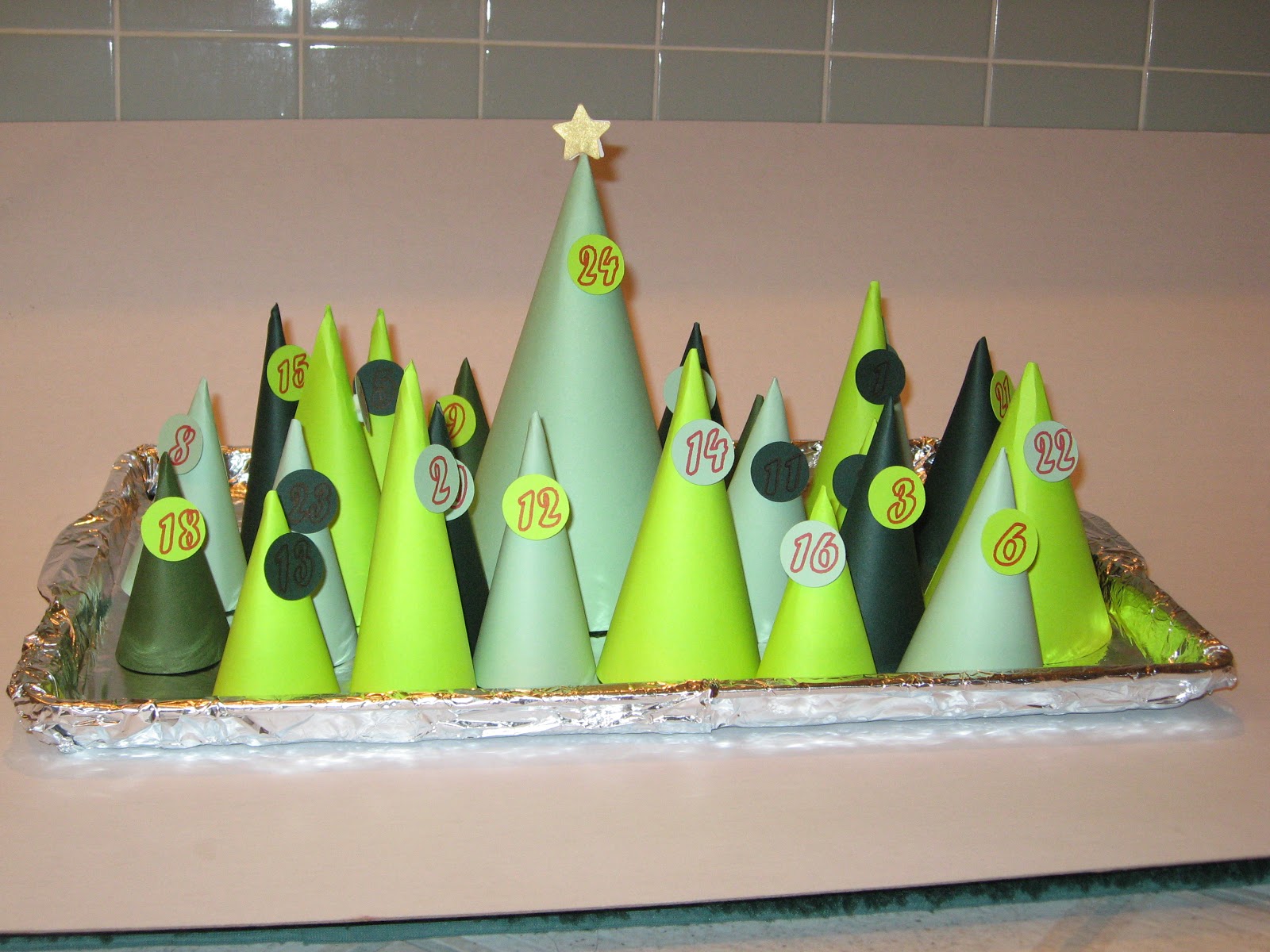
Tree Advent Calendar


I have yet another Advent Calendar to show you.  This one didn't take as long to make as some of my others (if you want to see a couple of the other ones you can see the Sleeps 'til Christmas Countdown here or you can see the Christmas Village Calendar here).  The idea came from Family Fun Magazine.  It's one of those magazines that started showing up in my mailbox.  I tend to put it in the car for light reading while I'm waiting in the car pool line.  Have I mentioned how much I'm starting to hate the car pool line?

Here is the link to the the Family Fun Magazine.  They have a template you can download but... what fun would that be.  For one thing, I don't like sitting around cutting 24 of these cones out with my scissors.  For another, I found that their cones weren't actually even in shape so I didn't like the way they worked.  So, Cricut to the rescue.  Using SCAL I traced a circle divided into 3 equal parts.  Here is a screen shot of my SCAL mat to cut the cones.
This was fairly easy to find in PDF form.  I then clicked on the keep proportions and resized it for the different sized trees.  I made the circle from 10 inches down to 6 inches.

Here are the circles and the numbers

You wouldn't want to cut this as it looks here.  If you did that the circle becomes too flimsy.  I used a marker on the numbers and cut the circles.  That means I hid the circles like this:
Then I put my marker in my E and pushed the scissors.  It then drew the numbers onto the paper.  Then I hid the numbers and showed the circles.  Like this:
Here is a close-up of one of the trees. 
And finally, I made the last cone the biggest.  It has the star on it and will have a slightly larger present than the other days, maybe a very small book.  All the other days I'm planning on rolling up a piece of paper with the name of a Christmas book.  Then, each night the Wonderkid find the appropriate tree and gets to see which book we'll read that night. 
I used Perfect Pearls on the star.  I really do love those Perfect Pearls.  I love the sparkle and they are so easy to use.  I have a tiny 1 1/2 inch Xyron which I put the stars into.  When they came out they had enough adhesive to hold the pearls.   Then I used a Glue Dot to stick the two stars to a skewer. 
Here is a side view of a tree.  You can see the pop dots I used for each of the numbered circles.
Now I only need to cut out another 15 sets (by my calculations, that means 360 cones and 360 circles).  The good news is I'm making them for an Advent Festival so I won't need to put them together. 

Sunday, November 14, 2010

Advent Calendar

Here is a new advent calendar.  It comes straight from Christmas Village.  I chose the one in keys 41 - 45.  I felt like it looked like a Middle Eastern (Bethlehem) village.  The one on the top row, keys 1 - 5 looks more like a Victorian Village.  If I get a chance in the next couple of days, I'll try to make that one also.

Because I was making a Middle Eastern town, I was looking for more earth tones as opposed to greens and reds.  In the end though, I decided the earth tones needed a lot of work.  It ended up looking far too bland.  So, I blinged it up. 

Here it is without any decorations.  I like the colors but they need a little something.

And now a picture with the domes decorated.  I used stickles on the first one.  That worked all right.  I liked the gold stickles at the very top of the dome.  On the second and third domes I used gold Perfect Pearls. This is the first time I've used Perfect Pearls, I'm in love.  I rubbed versamark all over the dome and then I "painted" the gold perfect pearls onto the dome. 


Look at how wonderful that dome looks.  It covers beautifully.  A little really does go a long way.  I'll definitely be using them again.

For variety, I used the copper Perfect Pearls on the last dome.  I loved the way that one looks also.  In order to get a nice line, I used blue painters tape and very carefully pulled it back off the paper after I was done with the domes.

I tried doodling and once again I'm reminded that I'm not a doodler.  This ended up looking like something a middle schooler might do.  If I was a middle schooler that would be fine, but I'm not.  So, I had to figure out whether I cut this piece again or try to cover up my doodling.  I decided to cover it up.

In order to give it a little more depth, I covered most of the doors and windows with a pattern paper.  It all came out of my scrap piles.  I used Effects Papercraft from Canson (I have no idea where I bought this and I tend to ration it because I love the iridescent and translucent papers). Then I used Deja Views' global Treks.  I love this paper.  It has a very Middle Eastern feel.  Finally, I used DCWV's At Home stack.  I think I have three or four stacks of this one.  I inked all of the doors and windows, some of them got an extra shot of ink across the front.

If you have made it through this entire post, I should give you the one bit of information I think would be helpful when making this advent calendar.  All of the boxes for the calendar are in the top row on Christmas Village.  They are keys 7 - 10.  But there is no information on the packaging to tell you how many of each you need.  Here is what I learned: 
1 of the large box (Key 7)
8 of the tall skinny box (Key 8)
6 of the medium box (Key 9)
10 of the small box (Key 10)


I don't know why this insists on going sideways but you can still see the boxes.
Here is the back of the advent calendar so you can see all of the boxes.  I used score tape to affix them.


If you want to see my other advent calendar you can see it here.  Later in the week I hope to have a couple more advent calendars to show you.  This one is going to Moma's church for the kids to use this year.