Hello Friends -
It is that time of week, the day when crafters around the globe open up their work spaces so you can poke around and see what is going on.
Here is my workstation this morning. It is in full on creation mode. The holidays have hit us with a vengeance. If you get a closer look, we have...
this week's cards for the ladies at Humbug Hall. I'm still trying to get my snowmen turned into actual cards. One has made it but I haven't found the perfect paper for the other two, yet.
And on this side, we have...
Two advent calendars needing to be put together. You can see two of the finished ones right behind the front piece of the unfinished one. I have quite a few of these to get done (I showed one to a lovely lady at the Wonderkid's school and she bought 6 -- yippee!!!).
Here is another picture of the pieces...
and now we have the "auxillary" work space...
I love being able to stand and work on my projects but sometimes there is a ton of glueing or cutting and I want to watch TV and do my project. That is when this breakfast tray comes out. I have done so much damage to it, it will never see another piece of food but it works well for sitting on the couch and working.
I'm embarrassed to show a close-up of the items on the tray because you'll also see the disgusting tray but...
Don't you just love the colors on this one? I've been in a non-traditional colors mood.
Recently, the Scrappy Jedi had a post all about die cutters. She described her interest in the new Silhouette Cameo as "Cameo fever". I think that is a great term. I have a terrible case of Cameo fever, especially when I see these advent calendars and these. If I could figure out how to get one today, I would be making those cool different calendars, until then, I'll be sticking with my SVGCuts. com calendar with SCAL.
OK, go poke around in everyone else's craft rooms. I know Julia will have something interesting going on. I also saw Kath's cubbyhole with all her birthday cards.
Showing posts with label advent calendar. Show all posts
Wednesday, November 9, 2011
Saturday, December 4, 2010
One More Advent Calendar
I purchased this Advent Calendar file from SVGCuts.com. It can be purchased here. I need to start this post off with a couple of observations. I did a LOT of Advent Calendars this year, five in total. Three of them I designed myself and two of them I "bought". The first was the Christmas Village Cartridge from Provo Craft. I normally find that purchasing something from Provo Craft (the maker of all the Cricut "stuff") is the easier way to do things. The cuts all fit together easily and they tend to be very straight forward.
Christmas Village was not that way. You can see my Bethlehem Village here. There were virtually no "directions" on how to make it fit together. You had two villages on one cart (the Middle Eastern/Bethlehem Village and the Victorian Village) and you had a bunch of boxes but no real idea about where they fit, what size they should be or how many you needed. It is a nice cartridge but it isn't intuitive like most of their carts and thus not easy to use. I think Robotz was similar but at least with that one you had everything you needed on one key and could work it out fairly quickly. That wasn't the case on Christmas Village. My other complaint about the cart is all of the figures have been made to stand up. If you want to put them on a scrapbook page, they will have a slit along the bottom. If Provo Craft would change the slit just a little, it could be hidden in Design Studio or with the Gypsy and then the uses multiply. Please, don't take this a slam against Provo Craft. I love my carts and I love using SCAL. Sometimes one is a better fit for what I want to do, sometimes another.
As tough as Christmas Village was, SVGCuts Advent Calendar was a breeze. They have a 15 minute tutorial online so you can watch one being put together. I think that made it more likely I would buy the file but it wasn't actually necessary once you started cutting the pieces out.
The bottom of the calendar is a plain square. If you don't change any of the dimensions (which you don't need to when importing it into SCAL) it will be 11.5 inches square. I made mine black.
Here are all of the pieces. The top 4 are the ones for the outer edge. The remainder of the pieces are the edges of each box.
As you can see, each box wall has the number on it so you can put it in the correct place on the calendar face. I had three sheets of 12 x 12 cardstock for the inner boxes alone. I must say these were very easy to fold, barely needed my bone folder and certainly didn't need my score board.
Here is a close-up of the bottom left corner. I love all the details. The directions describe the doors as 3 shades of green, two shades of red and white for most of the numbers. After doing this once, I would probably do more of them in solid shades and then emboss some, stamp some and decorate them in other ways.
Some of the boxes are fairly wide. It is easy to put a lip gloss in at least 4 of them. You could also fit things the size of 3 or 4 tea bags (as you can see in #19 here). I made gift tags to put inside #21 since that should be early enough that they can still be used this year.
These are some of the doors before I inked the edges and attached them to the appropriate doors.
This is the white glitter cardstock I used for the numbers. I was able to put one set of numbers on half a piece of 12 x 12 cardstock.
These are the two stacks I used for this project. The black was Recollections cardstock from Micheals. All of the other papers were from DCWV.
Christmas Village was not that way. You can see my Bethlehem Village here. There were virtually no "directions" on how to make it fit together. You had two villages on one cart (the Middle Eastern/Bethlehem Village and the Victorian Village) and you had a bunch of boxes but no real idea about where they fit, what size they should be or how many you needed. It is a nice cartridge but it isn't intuitive like most of their carts and thus not easy to use. I think Robotz was similar but at least with that one you had everything you needed on one key and could work it out fairly quickly. That wasn't the case on Christmas Village. My other complaint about the cart is all of the figures have been made to stand up. If you want to put them on a scrapbook page, they will have a slit along the bottom. If Provo Craft would change the slit just a little, it could be hidden in Design Studio or with the Gypsy and then the uses multiply. Please, don't take this a slam against Provo Craft. I love my carts and I love using SCAL. Sometimes one is a better fit for what I want to do, sometimes another.
As tough as Christmas Village was, SVGCuts Advent Calendar was a breeze. They have a 15 minute tutorial online so you can watch one being put together. I think that made it more likely I would buy the file but it wasn't actually necessary once you started cutting the pieces out.
The bottom of the calendar is a plain square. If you don't change any of the dimensions (which you don't need to when importing it into SCAL) it will be 11.5 inches square. I made mine black.
Here are all of the pieces. The top 4 are the ones for the outer edge. The remainder of the pieces are the edges of each box.
As you can see, each box wall has the number on it so you can put it in the correct place on the calendar face. I had three sheets of 12 x 12 cardstock for the inner boxes alone. I must say these were very easy to fold, barely needed my bone folder and certainly didn't need my score board.
Here is a close-up of the bottom left corner. I love all the details. The directions describe the doors as 3 shades of green, two shades of red and white for most of the numbers. After doing this once, I would probably do more of them in solid shades and then emboss some, stamp some and decorate them in other ways.
Some of the boxes are fairly wide. It is easy to put a lip gloss in at least 4 of them. You could also fit things the size of 3 or 4 tea bags (as you can see in #19 here). I made gift tags to put inside #21 since that should be early enough that they can still be used this year.
These are some of the doors before I inked the edges and attached them to the appropriate doors.
This is the white glitter cardstock I used for the numbers. I was able to put one set of numbers on half a piece of 12 x 12 cardstock.
These are the two stacks I used for this project. The black was Recollections cardstock from Micheals. All of the other papers were from DCWV.
I inked all of the edges with ColorBox. I hope you like my final Advent Calendar of the year. I must say, I had a couple of ideas for additional calendars which I hope to make for next year. One would be using some of the Tim Holtz ideas to do tags on a big ring with a very grunge feel to it. I'm thinking it would be great for one of my 20 something brothers.
Thank you for looking at my latest creation. I hope you have enjoyed it or at least learned something.
Tuesday, November 16, 2010
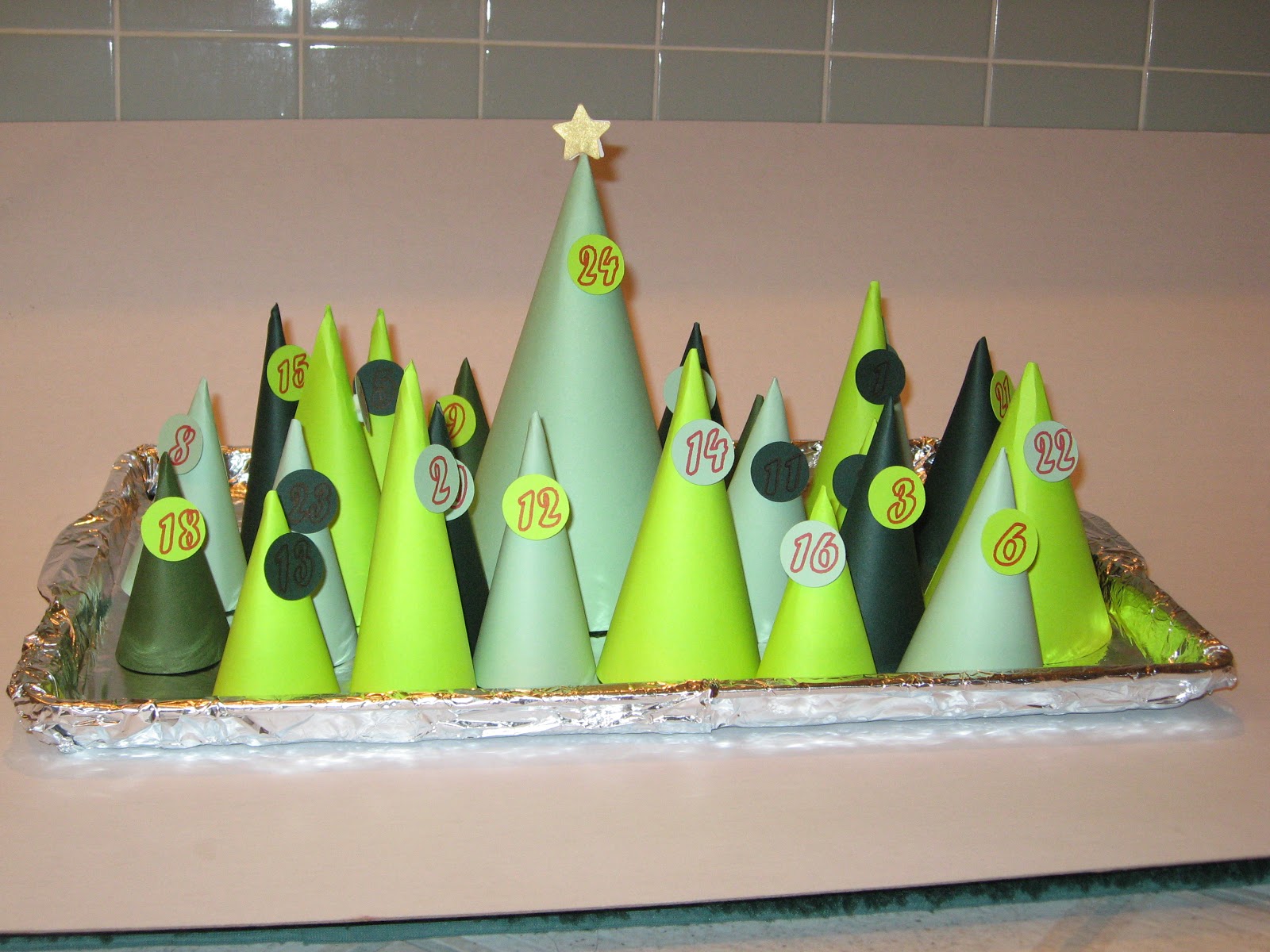
Tree Advent Calendar
I have yet another Advent Calendar to show you. This one didn't take as long to make as some of my others (if you want to see a couple of the other ones you can see the Sleeps 'til Christmas Countdown here or you can see the Christmas Village Calendar here). The idea came from Family Fun Magazine. It's one of those magazines that started showing up in my mailbox. I tend to put it in the car for light reading while I'm waiting in the car pool line. Have I mentioned how much I'm starting to hate the car pool line?
Here is the link to the the Family Fun Magazine. They have a template you can download but... what fun would that be. For one thing, I don't like sitting around cutting 24 of these cones out with my scissors. For another, I found that their cones weren't actually even in shape so I didn't like the way they worked. So, Cricut to the rescue. Using SCAL I traced a circle divided into 3 equal parts. Here is a screen shot of my SCAL mat to cut the cones.
This was fairly easy to find in PDF form. I then clicked on the keep proportions and resized it for the different sized trees. I made the circle from 10 inches down to 6 inches.
Here are the circles and the numbers
You wouldn't want to cut this as it looks here. If you did that the circle becomes too flimsy. I used a marker on the numbers and cut the circles. That means I hid the circles like this:
Then I put my marker in my E and pushed the scissors. It then drew the numbers onto the paper. Then I hid the numbers and showed the circles. Like this:
Here is a close-up of one of the trees.
And finally, I made the last cone the biggest. It has the star on it and will have a slightly larger present than the other days, maybe a very small book. All the other days I'm planning on rolling up a piece of paper with the name of a Christmas book. Then, each night the Wonderkid find the appropriate tree and gets to see which book we'll read that night.
I used Perfect Pearls on the star. I really do love those Perfect Pearls. I love the sparkle and they are so easy to use. I have a tiny 1 1/2 inch Xyron which I put the stars into. When they came out they had enough adhesive to hold the pearls. Then I used a Glue Dot to stick the two stars to a skewer.
Here is a side view of a tree. You can see the pop dots I used for each of the numbered circles.
Now I only need to cut out another 15 sets (by my calculations, that means 360 cones and 360 circles). The good news is I'm making them for an Advent Festival so I won't need to put them together.
Sunday, November 14, 2010
Advent Calendar
Here is a new advent calendar. It comes straight from Christmas Village. I chose the one in keys 41 - 45. I felt like it looked like a Middle Eastern (Bethlehem) village. The one on the top row, keys 1 - 5 looks more like a Victorian Village. If I get a chance in the next couple of days, I'll try to make that one also.
Because I was making a Middle Eastern town, I was looking for more earth tones as opposed to greens and reds. In the end though, I decided the earth tones needed a lot of work. It ended up looking far too bland. So, I blinged it up.
Here it is without any decorations. I like the colors but they need a little something.
And now a picture with the domes decorated. I used stickles on the first one. That worked all right. I liked the gold stickles at the very top of the dome. On the second and third domes I used gold Perfect Pearls. This is the first time I've used Perfect Pearls, I'm in love. I rubbed versamark all over the dome and then I "painted" the gold perfect pearls onto the dome.
Look at how wonderful that dome looks. It covers beautifully. A little really does go a long way. I'll definitely be using them again.
For variety, I used the copper Perfect Pearls on the last dome. I loved the way that one looks also. In order to get a nice line, I used blue painters tape and very carefully pulled it back off the paper after I was done with the domes.
I tried doodling and once again I'm reminded that I'm not a doodler. This ended up looking like something a middle schooler might do. If I was a middle schooler that would be fine, but I'm not. So, I had to figure out whether I cut this piece again or try to cover up my doodling. I decided to cover it up.
In order to give it a little more depth, I covered most of the doors and windows with a pattern paper. It all came out of my scrap piles. I used Effects Papercraft from Canson (I have no idea where I bought this and I tend to ration it because I love the iridescent and translucent papers). Then I used Deja Views' global Treks. I love this paper. It has a very Middle Eastern feel. Finally, I used DCWV's At Home stack. I think I have three or four stacks of this one. I inked all of the doors and windows, some of them got an extra shot of ink across the front.
If you have made it through this entire post, I should give you the one bit of information I think would be helpful when making this advent calendar. All of the boxes for the calendar are in the top row on Christmas Village. They are keys 7 - 10. But there is no information on the packaging to tell you how many of each you need. Here is what I learned:
1 of the large box (Key 7)
8 of the tall skinny box (Key 8)
6 of the medium box (Key 9)
10 of the small box (Key 10)
Here is the back of the advent calendar so you can see all of the boxes. I used score tape to affix them.
If you want to see my other advent calendar you can see it here. Later in the week I hope to have a couple more advent calendars to show you. This one is going to Moma's church for the kids to use this year.
Because I was making a Middle Eastern town, I was looking for more earth tones as opposed to greens and reds. In the end though, I decided the earth tones needed a lot of work. It ended up looking far too bland. So, I blinged it up.
Here it is without any decorations. I like the colors but they need a little something.
And now a picture with the domes decorated. I used stickles on the first one. That worked all right. I liked the gold stickles at the very top of the dome. On the second and third domes I used gold Perfect Pearls. This is the first time I've used Perfect Pearls, I'm in love. I rubbed versamark all over the dome and then I "painted" the gold perfect pearls onto the dome.
Look at how wonderful that dome looks. It covers beautifully. A little really does go a long way. I'll definitely be using them again.
For variety, I used the copper Perfect Pearls on the last dome. I loved the way that one looks also. In order to get a nice line, I used blue painters tape and very carefully pulled it back off the paper after I was done with the domes.
I tried doodling and once again I'm reminded that I'm not a doodler. This ended up looking like something a middle schooler might do. If I was a middle schooler that would be fine, but I'm not. So, I had to figure out whether I cut this piece again or try to cover up my doodling. I decided to cover it up.
In order to give it a little more depth, I covered most of the doors and windows with a pattern paper. It all came out of my scrap piles. I used Effects Papercraft from Canson (I have no idea where I bought this and I tend to ration it because I love the iridescent and translucent papers). Then I used Deja Views' global Treks. I love this paper. It has a very Middle Eastern feel. Finally, I used DCWV's At Home stack. I think I have three or four stacks of this one. I inked all of the doors and windows, some of them got an extra shot of ink across the front.
If you have made it through this entire post, I should give you the one bit of information I think would be helpful when making this advent calendar. All of the boxes for the calendar are in the top row on Christmas Village. They are keys 7 - 10. But there is no information on the packaging to tell you how many of each you need. Here is what I learned:
1 of the large box (Key 7)
8 of the tall skinny box (Key 8)
6 of the medium box (Key 9)
10 of the small box (Key 10)
![]() |
| I don't know why this insists on going sideways but you can still see the boxes. |
If you want to see my other advent calendar you can see it here. Later in the week I hope to have a couple more advent calendars to show you. This one is going to Moma's church for the kids to use this year.
Subscribe to:
Posts (Atom)